A payment gateway feature for merchants that simplifies payment collection and serves over 100K+ users.
Project Type
Professional
Timeline
March 2025
Team
1 Product Manager
UI/UX Designer (Me)
Tools
Figma
ChatGPT
What I did
Led the end-to-end design, enabling merchants to create, customize, and manage payment collection.
Identified usability improvements through competitor analysis.
Designed user flows, high-fidelity interfaces, and interactive prototypes across merchant and customer journeys.
Partnered with product managers and engineers through multiple iterations to refine the experience.
Overview
Zwitch is an API embedded finance platform that allows businesses to seamlessly integrate digital payments, banking features, and financial services directly into their apps and websites.
Zwitch Payment Pages is a no-code payment collection solution that allows businesses to create a hosted payment page and share it via a link to collect payments instantly from their customers. You do not need a website or an app to start accepting online payments from customers.
Create a payment page
Share a link
Collect payments seamlessly
Events and Tickets
Accepting Donations
Fees Collection
Product Sales
🧑🏻💼
Merchant
Businesses or individuals who create and manage payment pages.
🧑🏼💼
End Customer
Users who interact with the hosted payment page to complete payments quickly.
Impact
200+
Payment Pages Created
Merchants successfully created and customized over 200 payment pages within the first three month of launch.
10,000+
Customer Transactions Processed
Customers completed over 10,000+ successful transactions through this payment page during the initial launch month.
Identifying Merchant Friction
Through heuristic evaluation, internal reviews, and observation, we identified several friction points that made payment page creation complex for merchants.
Setup Can Feel Complex and Time-Consuming
Managing product details, pricing, payment settings, making the setup process difficult to navigate and increases cognitive load.
Lack of clarity in pricing structure creation
Multiple pricing models make it difficult for merchants to understand which setup best fits their business needs.
Limited real-time feedback while building
Merchants have limited visibility into how their payment page will appear to customers while configuring it.
Design Objectives
Designing a transparent, and flexible creation flow that reduces friction for merchants & end-customers
No Learning Curve
Create an intuitive setup experience that helps merchants complete page creation with minimal effort.
Enable Flexible Pricing Models
Provide multiple pricing options (fixed, donation, quantity) to support different use cases or businesses.
Real-Time Preview & Visibility
Enable a live preview experience so merchants can instantly see how their page will appear to customers.
Working Within an Existing Design System
Ideally, we wanted to revamp the entire visual experience more extensively, but since the product already relied on an existing design system, we had to work within those component limitations and delivery timelines.
As a result, the focus shifted toward improving usability, information architecture, and flow efficiency rather than completely redesigning the visual language.
Exploration / Iteration 01 - Inline Editing
Initially, we explored an inline editing approach where merchants could directly edit the live preview itself. The idea was to create a more visual and interactive editing experience.
We conducted multiple internal walkthroughs and iterative reviews where team members interacted with both approaches. However, During these reviews, we observed that users were taking longer to understand the inline editing structure because editing controls and preview content were competing for attention on the same screen.
❌ Inline Editing
Everything happens in one view
Difficult to discover editable fields
Pricing setup lacks clarity
Mapping the Merchant Flow
To improve clarity, we shifted toward a structured step-by-step flow. Breaking the process into three focused stages helped users mentally process one task at a time instead of handling everything simultaneously.
✅ Step-by-Step Flow
Structured and guided experience
Better task separation
Real-time feedback through preview
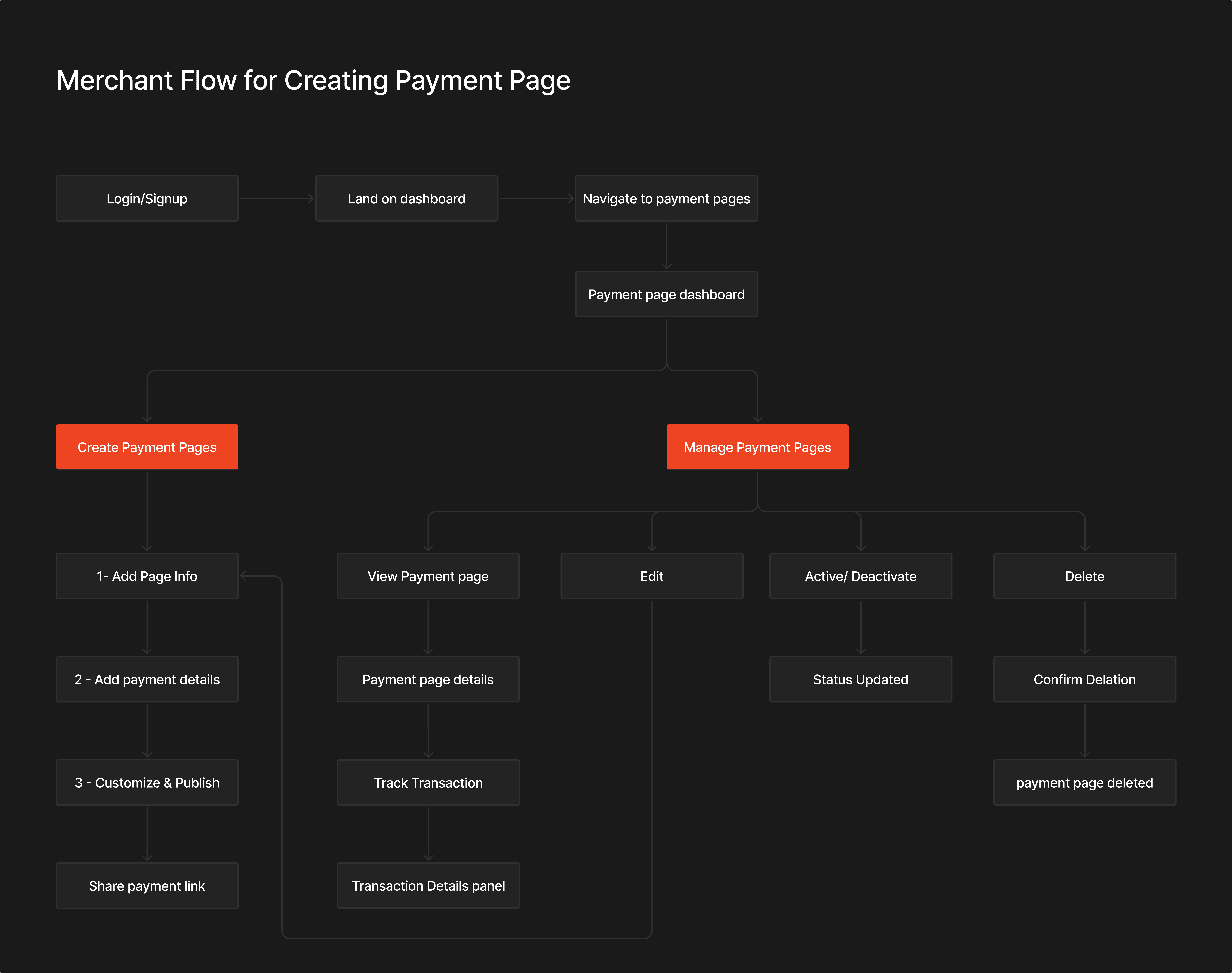
Simplifying Payment Page Creation
The step-based approach improved clarity and task separation.
Step 1 - Focused only on page and business details,
Step 2 - Focused on payment configuration,
Step 3 - Allowed users to customize, review and publish.
This reduced decision fatigue and made the creation process feel more guided and manageable.
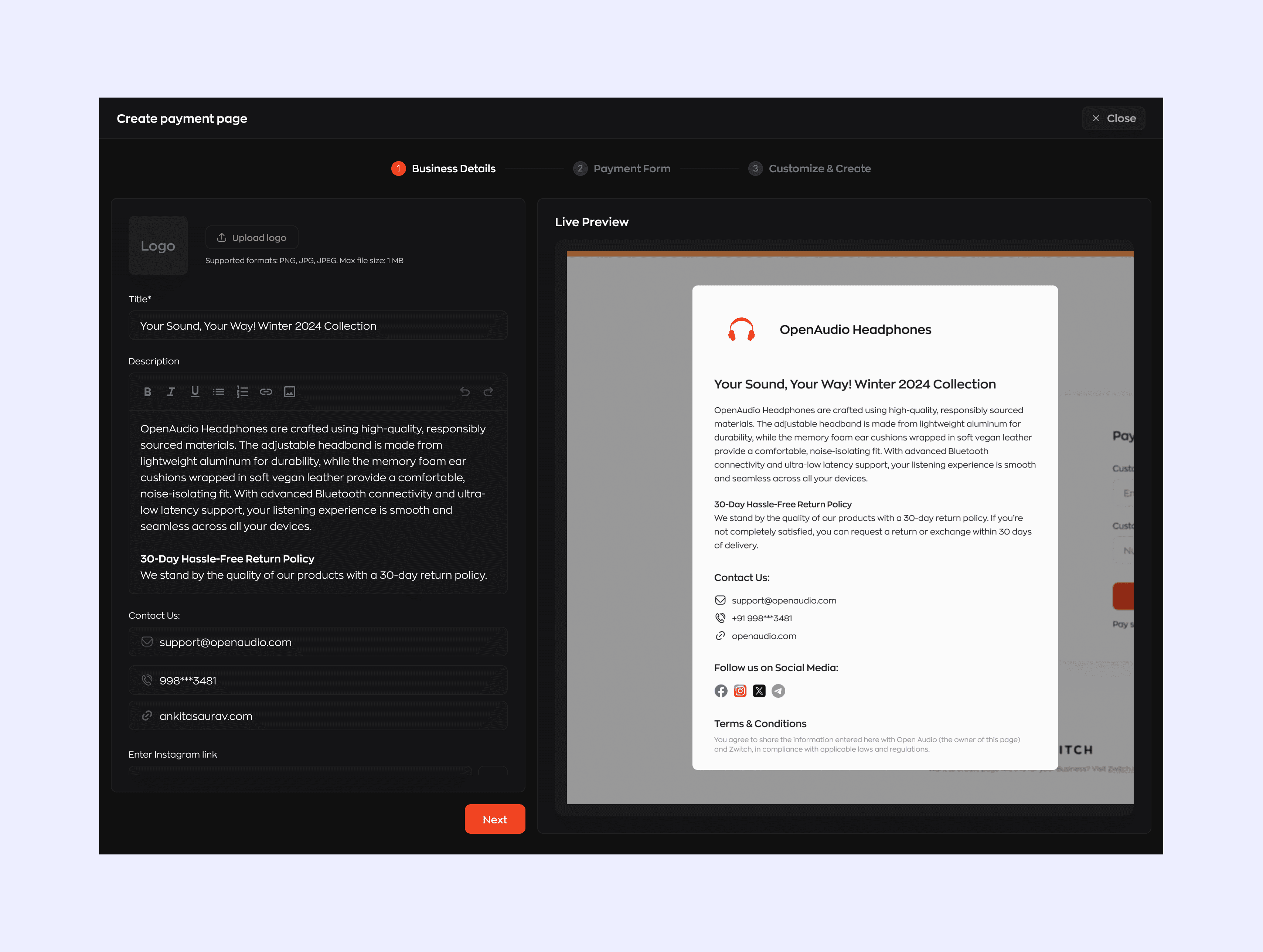


Live Preview Experience
At the same time, we still wanted users to maintain visibility into the final output. So instead of removing preview entirely, we introduced a live preview panel on the right side that updated dynamically as users entered information. This gave users immediate visual feedback

Support Flexible Pricing Models
We also designed different pricing models to support multiple business scenarios.
Fixed pricing could be used for product sales.
Customer-entered pricing was useful for donations.
Quantity-based pricing supported cases like bulk purchases or registrations.


Real-Time Tracking from the Dashboard.
After publishing the payment page, merchants get instant confirmation along with a shareable payment link that can be copied and shared to customers. The Payment Pages dashboard provides a view of all created pages, allowing merchants to manage, edit, activate/deactivate, or delete pages.
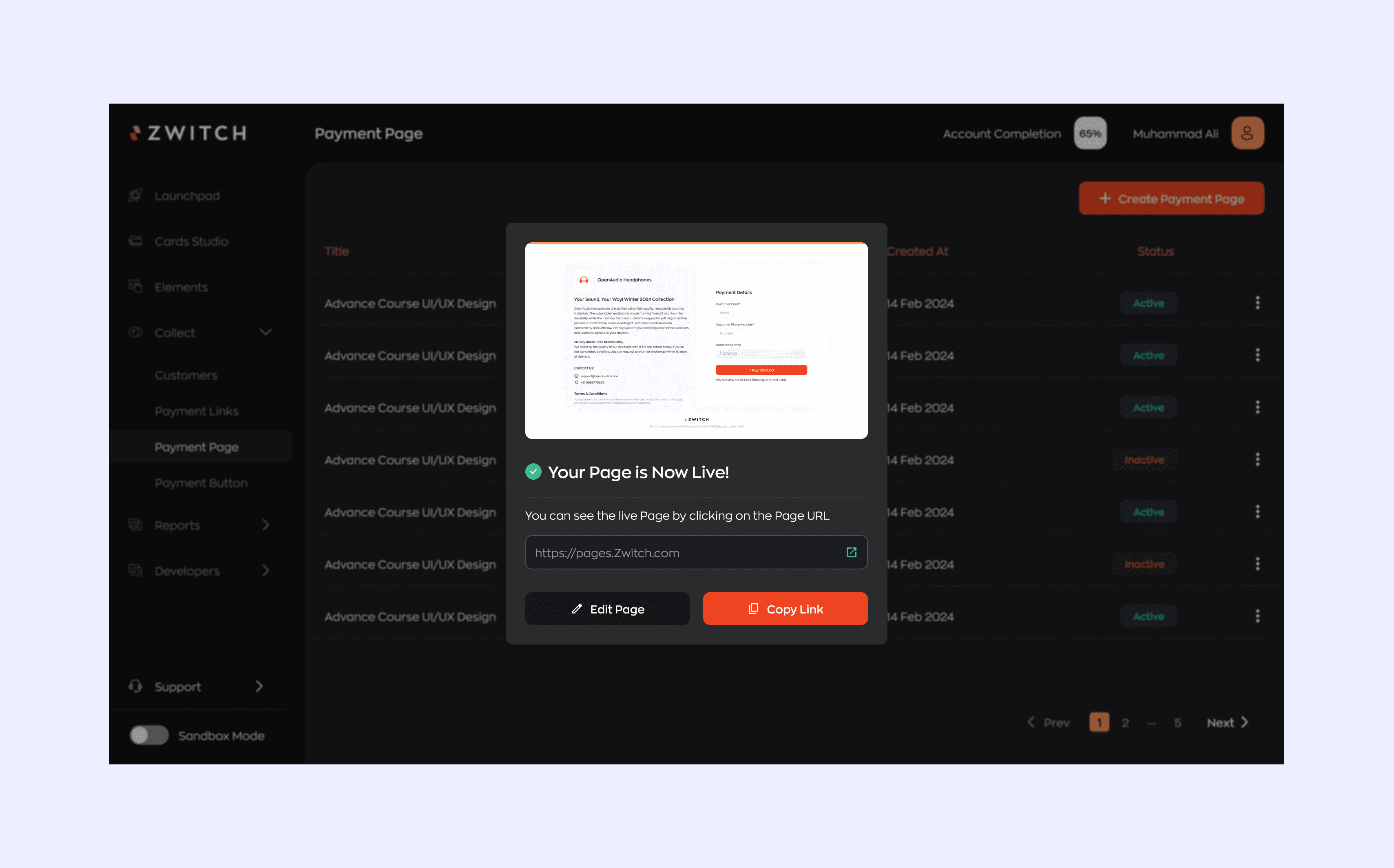

Merchants can access individual payment page details, view transaction details, and track payment activity over time.


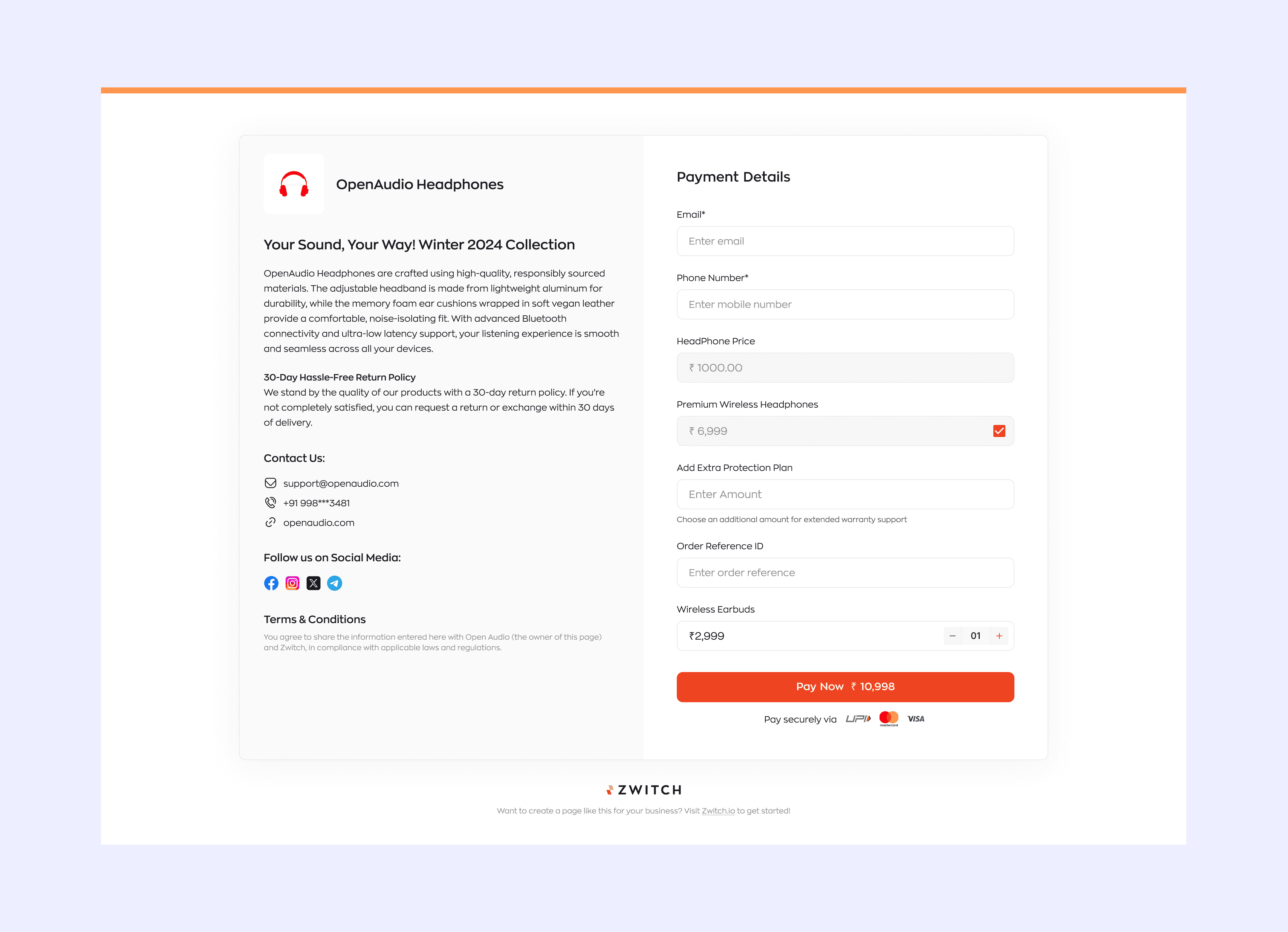
Final Customer-Facing Payment Page
Designed a clean and intuitive payment page experience for customers to review product details, enter required information, and complete payments with clarity.
Future Scope
Business-specific templates - Provide ready-to-use payment page templates based on different business types and use cases.
Save as draft - Allow merchants to save incomplete payment pages as drafts and continue editing later.
Visible order summary - Display the total payable amount prominently during the customer journey for better visibility.
Reach out to me for collaborations, Inquiries, or just to say hello on LinkedIn or at ankita221099@gmail.com
Made with ❤️ by Ankita Saurav